Home Lab
A Home Network in Three VLANs: Main, IoT, Cameras
Most home networks are flat, so one compromised device can reach everything. Three VLANs — main, IoT and cameras — split the network by trust, with firewall rules that make the split real.
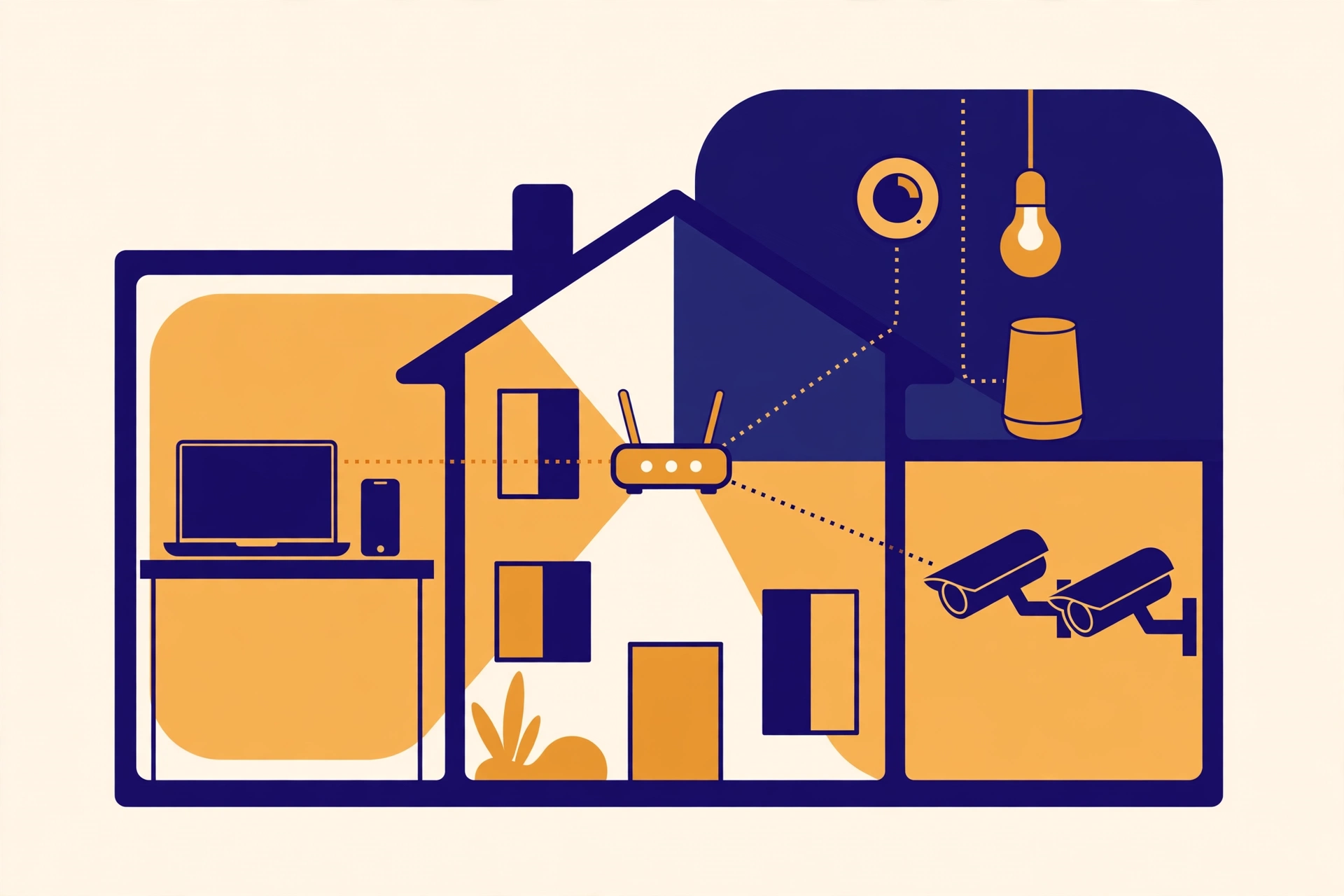
Most home networks are flat. One Wi-Fi password, one subnet, and everything on it can see everything else: the laptop with your bank login, the cheap smart plug you bought on sale, the camera by the front door, the visitor's phone. It works fine until one device doesn't. Then the question is not whether that device was compromised. It is how far the problem can walk from there.
A VLAN answers that question in advance. It splits one physical network into separate logical networks, each with its own subnet and its own rules. The switch and router still carry all the traffic, but devices in different VLANs cannot reach each other unless you write a rule that says they can. Three VLANs cover almost every home: main, IoT, and cameras. That is enough separation to matter, and few enough networks to actually maintain.
VLAN 1: main — the trusted network
This is where the devices you trust live: laptops, phones, tablets, and any computer or storage you would be unhappy losing control of. It gets full internet access and it is the only VLAN allowed to start connections into the other two.
Keep this network boring. Strong Wi-Fi password, devices you recognise, and nothing here that does not need to be here. A smart bulb does not belong here, however convenient it would be to put it on the same network as your phone.
Give it its own Wi-Fi name, mapped to the VLAN, so joining the right Wi-Fi puts a device on the right network. A separate name alone is not separation: two names on the same flat subnet are two doors into the same room.
VLAN 2: IoT — useful, untrusted, contained
Smart plugs, thermostats, speakers, TVs, voice assistants, doorbells: these need the internet, and very little else. They are also the hardest devices in the house to keep patched. Some stop receiving firmware updates after a year or two. Some never had a proper update mechanism at all.
Put all of them on the IoT VLAN and write the rules in one direction. Devices on the IoT VLAN can reach the internet, because most of them are useless without it. They cannot start connections to the main VLAN. Your phone on the main network can cast to the speaker or open the thermostat app, because that connection starts from the trusted side. The speaker cannot start a connection to your laptop. That one-way pattern is the whole point: a compromised plug can talk to its own cloud service, but it has no route to your files.
One detail catches people out: casting and device discovery rely on broadcast traffic that does not cross VLANs by default. If casting stops after the split, look for a setting to reflect that discovery traffic across VLANs, rather than tearing the VLANs down.
VLAN 3: cameras — recorded locally, kept quiet
Cameras deserve their own VLAN for a different reason. A camera watches your home, and its footage is the most sensitive data on the network. It also tends to be the device most exposed to the outside world, through a cloud account, a phone app, or a port someone opened once and forgot.
If you record locally, to a recorder on the same VLAN, cameras do not need internet access at all. Block it. They talk to the recorder, the recorder stores the footage, and your phone on the main VLAN views it through the recorder. A camera with no internet route cannot phone home, cannot be reached from outside, and cannot be used as a jumping-off point to the rest of the house. If a particular camera genuinely needs cloud access to work, that is a reason to reconsider the camera, not to punch a hole in the VLAN.
The recorder needs one narrow exception: the main VLAN may reach it for viewing. Everything else stays blocked.
The firewall rules that make it real
VLANs without firewall rules are labels, not boundaries. Some routers create VLANs that can still route to each other by default, which defeats the exercise. Check, don't assume. The rule set for three VLANs fits on a small list:
- Main can reach the internet, IoT, and the recorder for viewing.
- IoT can reach the internet only. No new connections to main, no new connections to cameras.
- Cameras can reach the recorder only. No internet, no main, no IoT.
- Nothing initiates a connection to the router's own management interface except from the main VLAN.
Test the rules the way an attacker would: from a device on the IoT network, try to reach a laptop on the main network. It should fail. From the camera network, try to reach the internet. It should fail. If either succeeds, the VLANs are decoration.
Two mistakes are worth naming. Don't use VLAN 1, the default, for anything sensitive: it is the VLAN every device lands on before you configure it. And don't add a fourth, fifth and sixth VLAN on day one. Each new segment is another set of rules to keep correct, and rules nobody maintains are the ones that quietly stop working.
What you need, and the order to do it in
You need a router or firewall that supports VLANs and firewall rules between them, a managed switch if you have wired devices, and access points that can map network names to VLANs. Most consumer all-in-one routers cannot do this properly, which is the one real purchase the project may need.
Do it in this order: list every device and its VLAN; create the VLANs and subnets; write the firewall rules, starting from deny; move devices over one VLAN at a time, starting with IoT, testing each move; then write the list down — VLAN numbers, subnets, and the reason for each rule — somewhere you will find it in a year.
The Takeaway
Split the network by trust, not by room or by brand: main for devices you trust, IoT for devices that need the internet but earn no trust, cameras for footage that should never leave the house. Then enforce the split with firewall rules that default to deny, allow the main network to reach out, and let nothing else start a conversation it has no business starting. Three VLANs, four rules, one list of what lives where — and a compromised smart plug stays a broken smart plug instead of becoming a way into everything else.
Further Reading
Preventive, Predictive, Condition-Based — Choosing the Right Mix — The same discipline applied to plant work: decide what each asset gets, in advance, rather than improvising when something fails.
What is a VLAN? How does it simplify segmenting the network into smaller sections for easy monitoring? — A plain explanation of VLAN segmentation, broadcast domains, and why separating subnets simplifies management.
What Is a VLAN? The Key to Network Segmentation & Security — VLAN tagging, trunk versus access ports, and the misconfigurations — open trunks, missing access controls — that undo the separation.
More from the blog
 ProjectsHow Owners Evaluate Bids — Inside a Techno-Commercial EvaluationA bid that passes pre-qualification, a technical read of the method, prices normalised to one basis and a whole-life view may still not be the cheapest — but it will be the one you can defend, to a board, an auditor, and the plant that has to live with it.Read post →
 MaintenanceMinor at 30K, Major at 60K — The Rhythm of Engine OverhaulsAn engine wears out on hours, not dates. The 30,000-hour minor is a checkpoint whose measurements shape the 60,000-hour major — and across a 32-engine fleet, sequencing, spares and records are what make the programme work.Read post →
 EnergyWhy the Grid Struggles at 7 pm: Peak Demand, ExplainedThe evening peak is not a shortage of plants. It is a timing problem: demand climbs as solar falls away, and the system must ramp faster than its slowest plant can move — buying the last megawatts from the dear end of the merit order.Read post →